
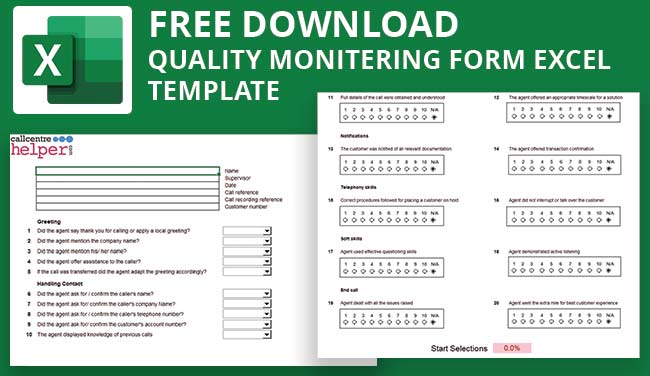

Call Centre Helper has produced a free and downloadable Excel Quality Monitoring form, that can be used as a call quality monitoring scorecard or as a call audit template.
We’ve been busy working on our call quality monitoring form to make it easy to adapt, and be able to include both yes/no-type questions and rate-scoring questions. It is a free Excel-format call scoring matrix that you can use to score calls and ensure compliance.
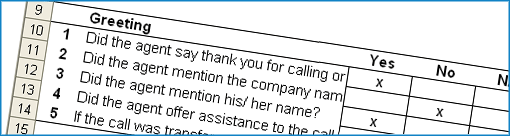
The editable feature means you can customise it. Example uses of the form include: as a agent evaluation form, agent coaching form or call quality checklist.
Using this call centre quality scorecard template, you can carry out silent monitoring of your agents, to conduct agent evaluation and active coaching. This is further explained in this article on Call Quality Monitoring.
This is a simple Excel spreadsheet (.xls), containing no macros, and there’s no password needed if you want to change and adapt the form for yourself.
Free Download – Call Monitoring and Evaluation Form
Do you want to download this to use?
Get your download of the Free Call Monitoring and Evaluation Form now:

We hope you get some benefit from this tool. If you adapt it, for example to add in weightings, please email us a copy so that we can share it with other members of the community.
Terms and Conditions
Use of the Monitoring Form is subject to our standard terms and conditions.
Where Did the Quality Monitoring Form Originate?
The inspiration for the sample call monitoring form came from Jonathan Evans of TNT.
Jonathan was involved with a global project to drive up the quality of calls so that they could deliver consistently high customer service over the phone.
One of the first steps of this project was to record all incoming calls into the business and to monitor five calls per agent per month.
We would like to thank Jonathan for being able to provide us with the original copy of the call scoring matrix. We have been able to add in the functionality to make it much more flexible.
You Will Find 3 Worksheets Inside this Spreadsheet
1. Call Monitoring Form
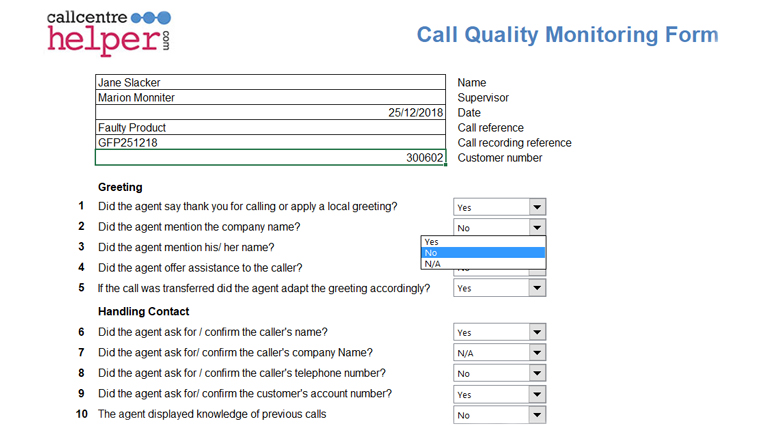
There’s the main “Form” where the questions are answered. Here there’s space for agent details, 10 yes/no-type questions and 10 scoring questions.
All the questions and options used by the form are contained in the worksheet “Options”. Here you can choose the exact wording to appear in each dropdown, e.g. Yes/No could just as easily be True/False. You can set your own questions to be answered by overwriting the example questions and they will automatically pull through on to your form.
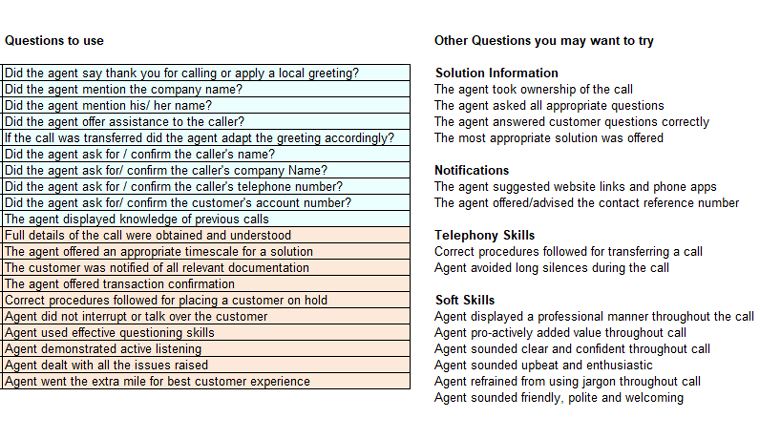
2. List of Quality Questions to Ask Examples
In addition to the examples installed on the form, we have included a list of other questions that we know are popular and that you may want to use.
As the questions on the form are answered, scores accumulate to show a final percentage score and a message.
You can easily change the thresholds and the message to be displayed.
3. Call Scoring Worksheet
If a user determines a question to be ‘not applicable’ then the maximum score for this question is set to 0 so that not answering the question doesn’t affect the final rating, otherwise Yes/No-type questions score 1 for Yes, 0 for No out of a maximum of 1. Rating questions score from 1 to 10 with a max score of 10.
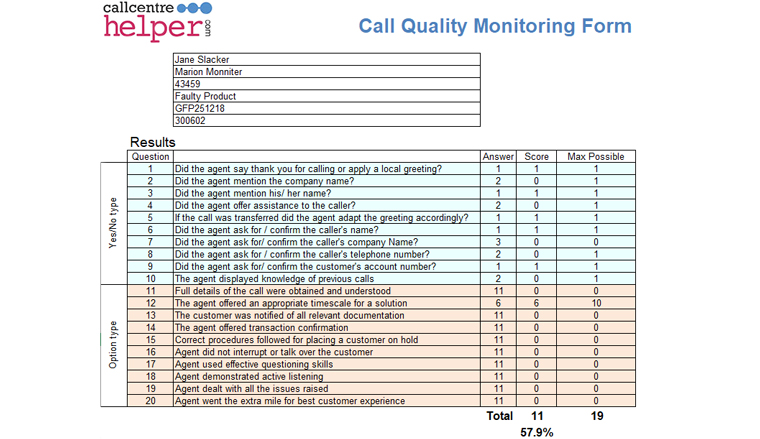
For convenience, the scores are totalled separately on the “Scoring” worksheet. You can either leave this alone, and have a clear view of the current scores, or you can adapt it if you wish so that different scoring rules are applied.
Download the call quality monitoring form
We hope you find this spreadsheet useful and a good start for your own forms. If you do adapt it, please consider sending us a copy so that we can share changes and improvements with the Call Centre Helper Community.
Leave any questions or comments below. We’ll answer them for everyone and make any updates as needed.
Once you have started to use the call quality monitoring, evaluation and coaching form, take a look at this article with 30 Tips to Improve Your Call Quality Monitoring, for useful advice on how to improve quality monitoring in your call centre.
How to Use the Call Monitoring Form
The call monitoring form is based on Microsoft Excel. It is not password protected, so that you are free to change it to fit in with your specific internal requirements.
Most of the questions are generic and could apply to most contact centres. You would need to change the “Transaction information” section to fit in with the specific needs of your business.
To vote simply add an “x” into the appropriate column. The numbers of votes are added up at the bottom. The percentage score is the quality score and it represents the total number of Yes votes, compared to the total number of No votes.
It has been designed so that if a section is not applicable to a call (for example in the case of a transfer) then this does not have a negative impact on the quality score.
If you use this call quality monitoring form to audit your staff for training, or evaluating performance, please look at our article on Call Quality Evaluation, for more information on call quality analysis.
If you are looking for more excel versions of useful contact centre tools, check these out next:
- Excel Based Erlang Calculator for Contact Centres – with Maximum Occupancy
- Monthly Forecasting Excel Spreadsheet Template
- Contact Centre Dashboard Excel Template – FREE Download
Author: Jonty Pearce
Reviewed by: Robyn Coppell
Published On: 3rd Jun 2009 - Last modified: 13th Aug 2025
Read more about - Essential Call Centre Tools, Employee Feedback, Excel, Free Downloads









Thank you for the form, it was very useful. This type of free information exchange is really very helpful.
This is amazing thank you so much for the monitoring sheet. It is awesome 🙂
Love the form! I’m a CSR manager looking for a easy template to build off of, yours worked perfectly… Thanks for sharing…